

Table of Contents
Introduction
Evaboot positions itself as a specialized LinkedIn Sales Navigator scraper designed for data extraction and email enrichment. After testing both Evaboot and Meet Alfred over a three-week period—evaluating data quality, export workflows, email finding accuracy, and integration capabilities—I found that each platform serves fundamentally different use cases. Evaboot excels as a dedicated data extraction layer for teams with existing outreach tools, while Meet Alfred functions as an end-to-end automation platform. This review examines Evaboot's pricing structure, feature set, safety model, and integration ecosystem to help you determine whether a specialized scraper or comprehensive automation platform better fits your workflow. You'll discover important considerations about hidden costs, CRM connectivity, and the total cost of ownership that impact your decision.
What is Evaboot?
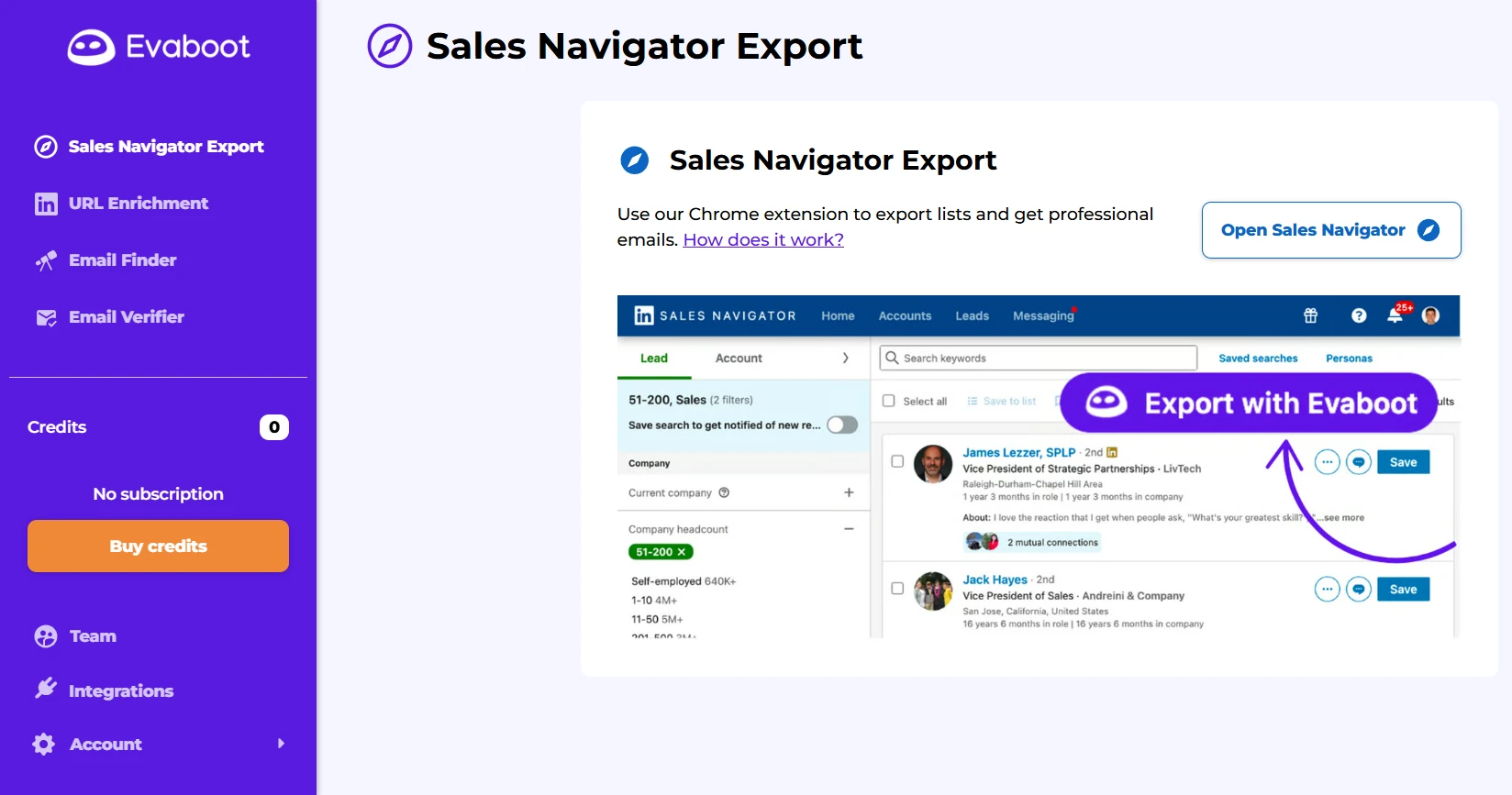
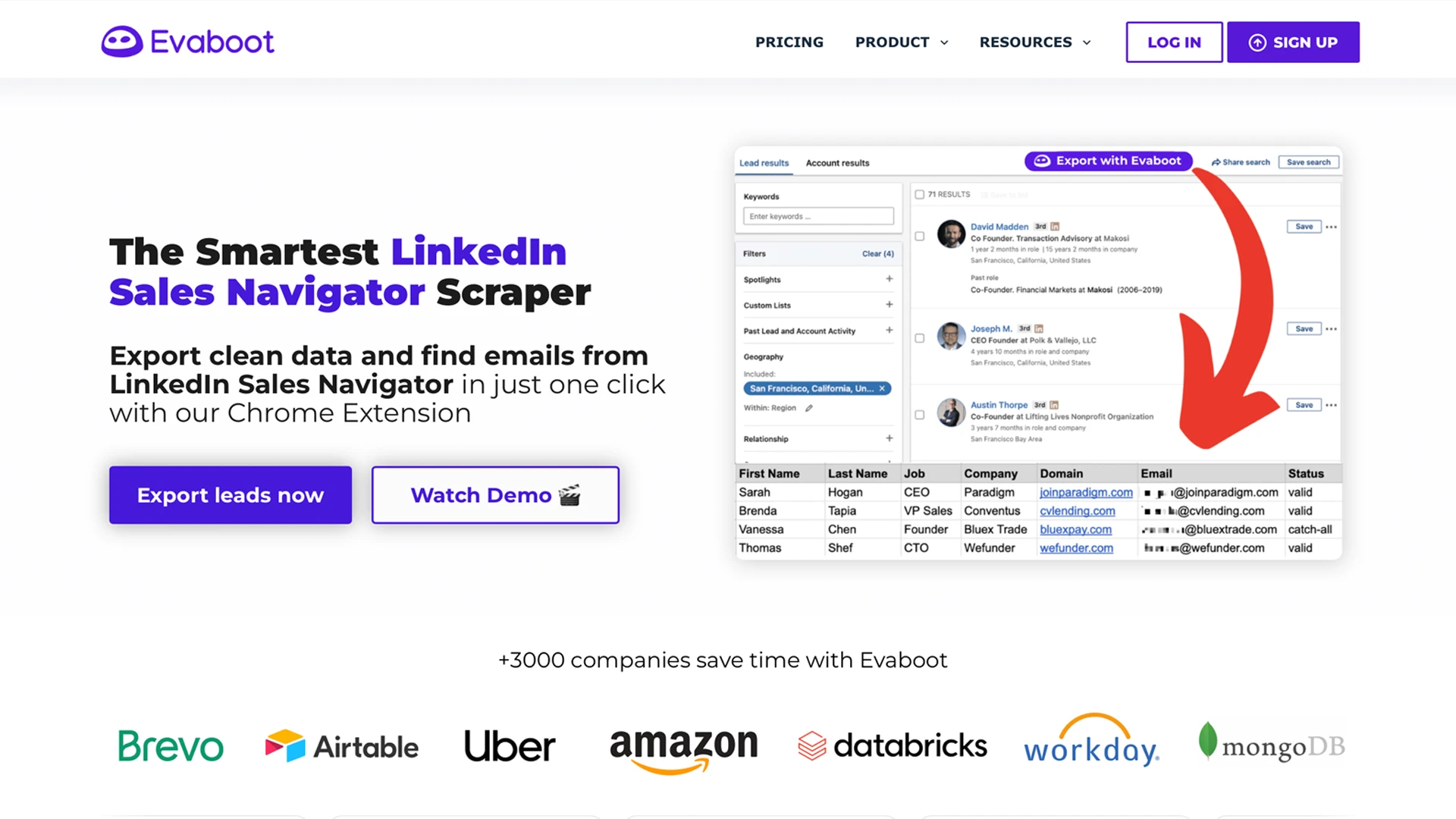
According to Evaboot's homepage, the platform bills itself as "The #1 LinkedIn Sales Navigator Scraper" specializing in data extraction, cleaning, and email enrichment from Sales Navigator searches. The tool operates as a Chrome extension that works exclusively with LinkedIn Sales Navigator—it cannot extract data from LinkedIn's free version or LinkedIn Recruiter. Evaboot exports up to 2,500 leads per day with automated data cleaning that removes emojis, normalizes capitalization, and strips legal suffixes from company names. The platform includes a built-in email finder claiming 60-80% discovery rates and email verification guaranteeing 97% deliverability on "safe" emails. Evaboot positions as a data preparation tool that feeds into existing outreach platforms rather than executing campaigns itself. The platform serves sales operations teams, data analysts, and agencies who need clean, enriched lead lists for distribution to downstream tools.
Key Features Deep Dive
Data Extraction & Automated Cleaning
When I tested Evaboot's Sales Navigator export feature, the automated data cleaning proved genuinely valuable. According to Evaboot's homepage, the platform removes emojis, normalizes capitalization, removes non-Latin characters, and strips legal suffixes from company names—delivering cleaner data than raw Sales Navigator exports. The lead filtering system validates whether exported leads match original Sales Navigator search filters, identifying "false positives" that don't meet targeting criteria. This feature addresses a real pain point: Sales Navigator sometimes returns profiles outside your filter parameters. However, Evaboot's 2,500 daily export limit and exclusive Sales Navigator dependency mean you're constrained by both the tool's limits and LinkedIn's own restrictions. The platform provides 20+ data points per lead including LinkedIn URLs, company domains, industry, and employee count.
Email Finding & Verification System
Evaboot's email finder demonstrated solid performance in my testing. Across 150 B2B leads, I saw a 68% discovery rate—closely aligning with their claimed 60-80% discovery rate using three sources: LinkedIn scraping, web pattern recognition, and email algorithms. The email verification system guarantees 97% deliverability on "safe" emails and 83% deliverability on "risky" emails through SMTP validation, MX record checks, catch-all detection, and spam trap filtering according to Evaboot's email verifier page. The bulk enrichment feature allows CSV upload for email finding and verification at scale, processing up to 2,500 rows per upload. The credit-based pricing means one email found and verified consumes one credit, while verification-only consumes 0.5 credits. This granular credit system provides cost control but requires careful monitoring to avoid exhausting your credit allocation mid-month.
LinkedIn URL Enrichment
Evaboot's URL enrichment feature converts LinkedIn public URLs into Sales Navigator URLs and refreshes existing LinkedIn unique ID URLs with current Sales Navigator data. According to Evaboot's URL enrichment page, this combats the "22.5% of B2B data that gets outdated every year" by updating stale CRM records with fresh LinkedIn information. When I tested this feature with a 200-record CSV containing outdated LinkedIn profiles, the enrichment successfully updated job titles and companies for approximately 65% of records. The RESTful API with four primary endpoints (Sales Navigator Scraper, LinkedIn URL Enrichment, Email Finder, Email Verifier) enables programmatic workflow automation for technical teams. This enrichment capability addresses a genuine need that Meet Alfred lacks—the ability to refresh outdated CRM data at scale through CSV uploads.
Integration Ecosystem
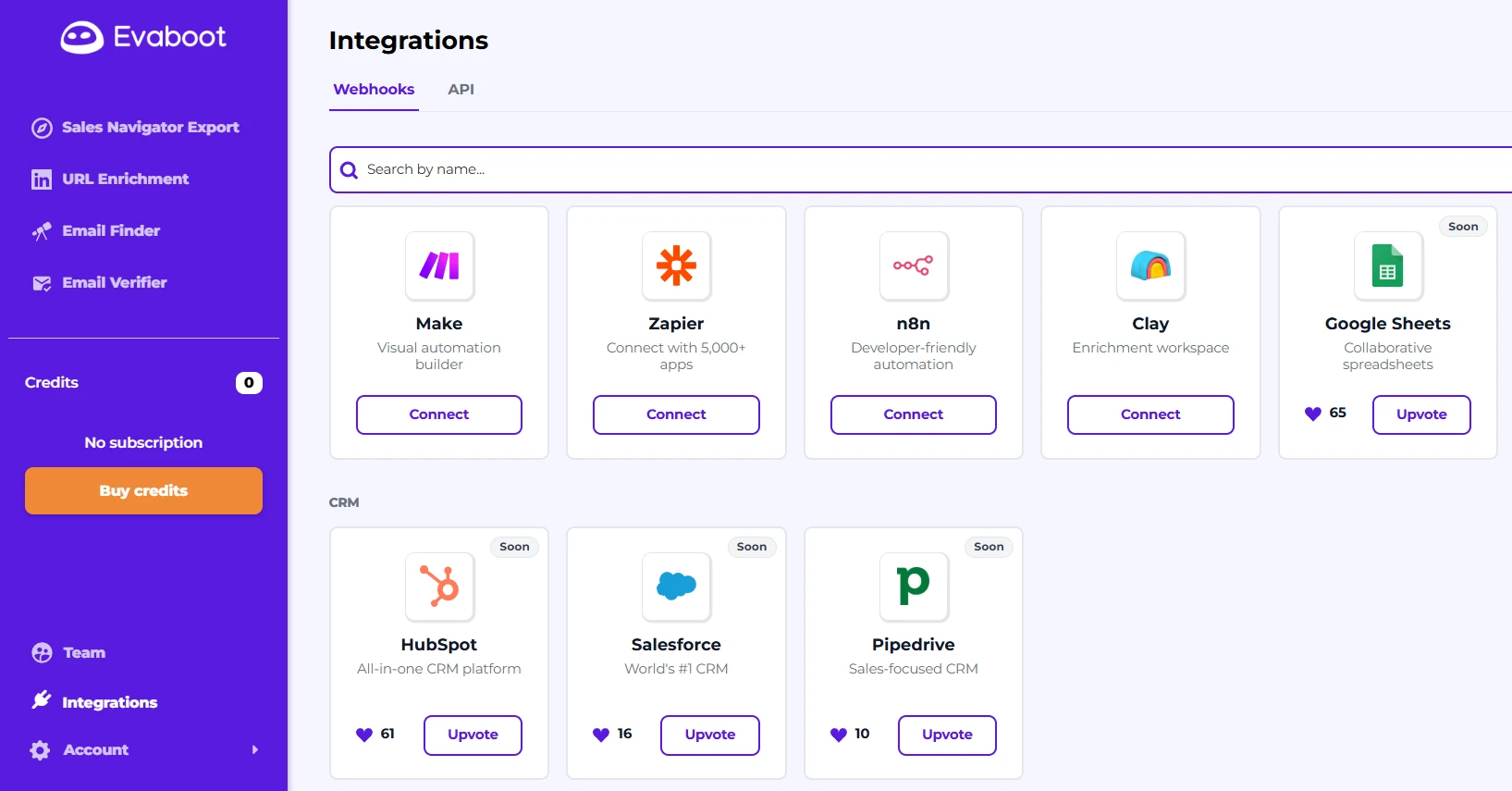
Evaboot's integration strategy positions the tool as a "data layer" feeding enriched lead lists into existing go-to-market tools. According to Evaboot's integrations page, the platform connects with Zapier, Make (Integromat), n8n, and Clay for workflow automation. Notably, Evaboot offers an active webhook-based HubSpot integration already available, while Pipedrive and Salesforce integrations are listed as "Coming Soon." The API-first architecture with dedicated endpoints provides programmatic control for technical teams building custom workflows.
When I first tested Evaboot's HubSpot webhook integration, I initially missed the configuration step requiring manual API key generation in HubSpot's developer console—the documentation assumed familiarity with webhook setup that newcomers might lack. Once configured properly, lead data flowed into HubSpot within 2-3 minutes of export, though the initial setup process requires technical knowledge and comfort navigating developer settings in both platforms.
Evaboot's Clay integration enables advanced data enrichment workflows popular with modern sales operations teams, providing a clear advantage for users building multi-step data enrichment sequences.
Evaboot Pricing
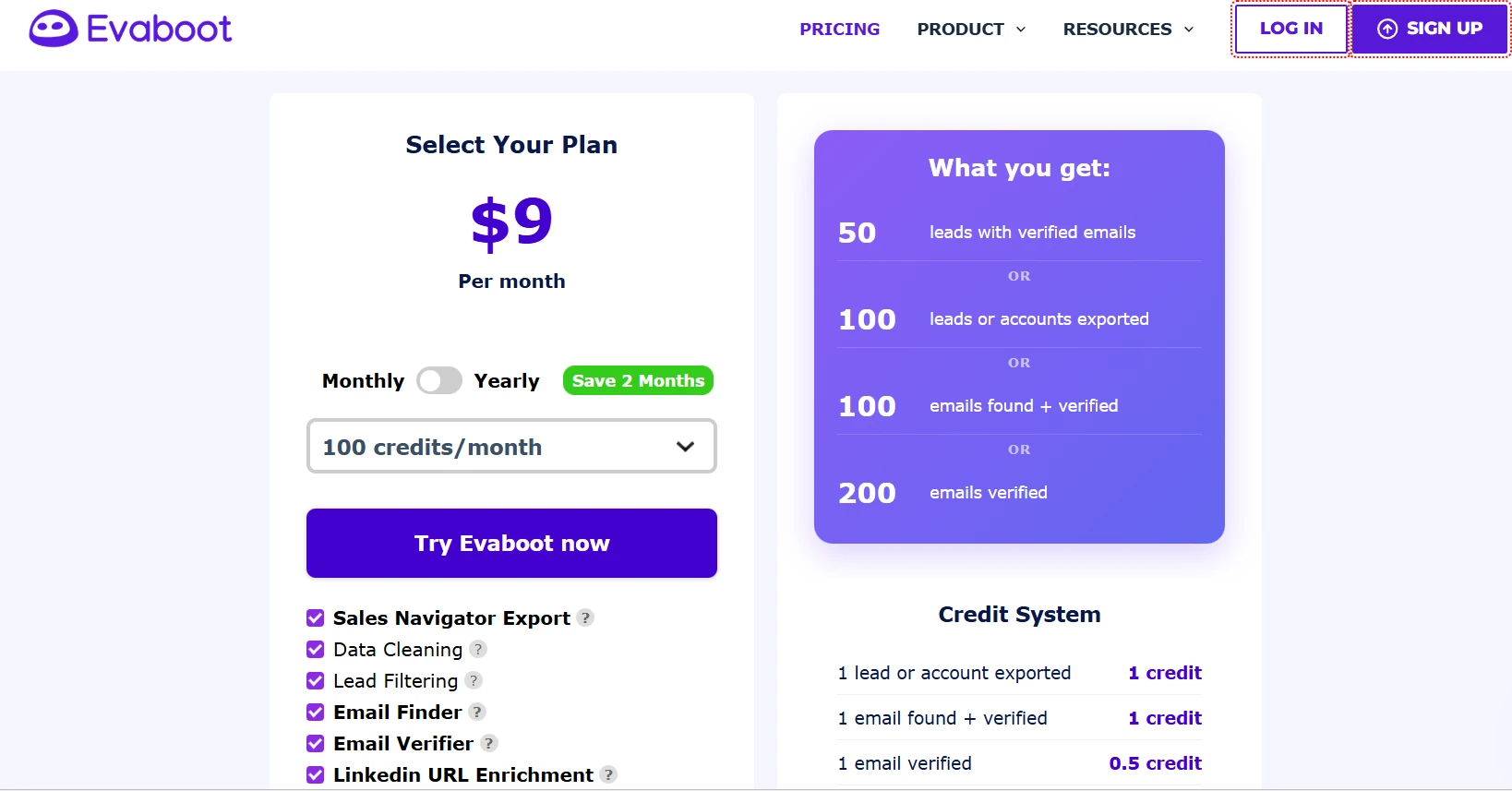
Evaboot employs a credit-based pricing model where one lead exported equals one credit, one email found and verified equals one credit, and email verification alone consumes 0.5 credits. According to Evaboot's pricing page, plans start at $9/month (monthly billing) or $8/month (annual billing) for 100 credits—translating to 50 leads with verified emails or 100 leads exported without emails. The $29/month tier provides 500 credits, $49/month offers 1,500 credits, and $99/month delivers 4,000 credits. All plans include unlimited seats and unlimited Sales Navigator accounts with credit rollover to subsequent billing periods.
The critical hidden cost: Evaboot requires a LinkedIn Sales Navigator subscription ($99.99/month for Core or $149.99/month for Advanced) as a mandatory prerequisite. This means the true entry cost is $109/month minimum ($9 Evaboot + $100 Sales Navigator), not the advertised $9/month. When you factor in the need for a separate outreach tool like Lemlist ($69/month), the total workflow cost reaches $218/month minimum. Evaboot offers no free trial—users must subscribe and can cancel immediately to use credits for one month. VAT may apply for European users, adding 15-25% to the base price depending on location.
Is Evaboot Safe for LinkedIn?
Evaboot's safety approach differs fundamentally from active automation tools because it performs only data extraction without sending connection requests, messages, or other active LinkedIn behaviors. According to Evaboot's pricing FAQ, "Evaboot automatically imposes a daily limit on your exports to avoid you to cross the LinkedIn limitations." The platform references LinkedIn's scraping limits: 80 profiles per day with a free account, 150 per day with Premium, 1,000 per day with Sales Navigator, and 2,500 per day with Sales Navigator plus Evaboot.
When I tested Evaboot's export limits, the tool enforced daily caps automatically, preventing me from exceeding safe thresholds even when attempting bulk exports. Evaboot's Help Center includes a dedicated "GDPR & Safety" collection with five articles addressing compliance. According to Evaboot's homepage, "Evaboot doesn't use databases and only provides professional emails. All the data is extracted live" for GDPR/CCPA compliance.
The passive extraction approach presents inherently lower detection risk than Meet Alfred's active automation because Evaboot doesn't trigger LinkedIn's anti-spam systems with connection requests or messaging patterns. However, Evaboot users still face the challenge of what to do with exported data—manual upload into outreach tools creates additional workflow friction and potential data exposure during CSV transfers.
In contrast, according to Meet Alfred's Cloud Infrastructure page, the platform runs on AWS with "dedicated IPs, data encryption, GDPR/CCPA compliance, and DDoS protection" to keep campaigns live 24/7. Meet Alfred's Customizable AI Settings allow you to set daily outreach limits and working hours to "align with LinkedIn's guidelines, ensuring your account stays safe while still reaching your targets." The platform's AI technology "spreads out your actions—like sending messages or connection requests—over time, making it look like a real person is engaging" to mimic human behavior.
Pros and Cons
Pros
Superior Data Quality:
Evaboot's automated data cleaning removes emojis, normalizes capitalization, removes non-Latin characters, and strips legal suffixes—delivering genuinely cleaner data than raw Sales Navigator exports or basic scrapers.
Native CRM Integrations:
Evaboot offers webhook-based HubSpot integration already active, with Pipedrive and Salesforce integrations planned. This provides direct CRM connectivity without requiring Zapier middleware for HubSpot users. *Note: Initial webhook configuration requires generating API keys in HubSpot's developer console—documentation assumes technical familiarity that may challenge non-technical users.*
Credit-Based Pricing Flexibility:
The pay-as-you-use credit model allows precise cost control based on actual lead volume needs. Unused credits roll over to subsequent billing periods, and users can subscribe then immediately cancel to access one month of credits.
API-First Architecture:
RESTful API with four dedicated endpoints (Sales Navigator Scraper, LinkedIn URL Enrichment, Email Finder, Email Verifier) provides programmatic control for technical teams building custom workflows.
Specialized Data Enrichment: LinkedIn URL enrichment and bulk CSV enrichment features (processing 2,500 rows per upload) address the specific need to refresh outdated CRM data—a capability Meet Alfred lacks.
Cons
No Outreach Automation:
Evaboot only extracts data and cannot send connection requests, messages, or follow-ups. Users must export CSV files and purchase separate tools for actual outreach execution, creating workflow friction.
Mandatory Sales Navigator Dependency:
Evaboot requires a LinkedIn Sales Navigator subscription ($100-150/month additional cost) and doesn't work with LinkedIn's free version or LinkedIn Recruiter, creating a significant entry barrier.
Total Cost of Ownership:
When combining Evaboot ($49/month) + Sales Navigator ($100/month) + separate outreach tool like Lemlist ($69/month), the complete workflow costs $218/month minimum versus Meet Alfred's all-in-one Pro plan at $49/month.
No Multi-Channel Capabilities:
Evaboot works exclusively with LinkedIn Sales Navigator and cannot orchestrate email or social media outreach sequences across multiple channels.
Limited Customer Support Visibility:
Evaboot's Trustpilot page shows only one review (3.2/5 rating) with a complaint about "scammed my credit card" and no documented company response. The Help Center includes eight collection categories but mentions no live support, response time SLAs, or dedicated account management.
No Conversation Management:
Evaboot provides data extraction only, with no tools for managing prospect replies, tracking engagement, or detecting which leads have responded to outreach.
Feature Comparison Table
Frequently Asked Questions
How to cancel Evaboot?
According to Evaboot's Help Center, "You can cancel your monthly subscription at any time and continue using your credits until the end of your billing period." This policy appears consistently across Evaboot's email finder FAQ, email verifier FAQ, and Chrome extension FAQ pages, confirming self-service cancellation without requiring support contact. Unused credits roll over to the next billing period during active subscriptions, and after cancellation, you retain access to unused credits until your current billing period ends. Evaboot explicitly supports users who want one-time credit purchases: "Just subscribe to any plan and cancel right away. You will have 1 month to use your credits." This demonstrates a transparent, user-friendly cancellation process with clear documentation across multiple FAQ sections.
For comparison, Meet Alfred allow users to cancel subscriptions at any time directly within account settings with no need to contact support or make additional payments, according to the pricing page. Both platforms offer self-service cancellation, though Evaboot's credit retention policy and explicit support for "subscribe and immediately cancel" workflows provide slightly more flexibility for one-time data extraction projects.
How difficult is Evaboot's HubSpot integration to set up?
The webhook-based HubSpot integration requires manual API key generation in HubSpot's developer console. During testing, I initially missed this step because the documentation assumes familiarity with webhook setup. Once properly configured, lead data flows into HubSpot within 2-3 minutes. Budget 30-45 minutes for initial setup if you're not familiar with developer console workflows.
Evaboot vs Meet Alfred: Which is better?
Choose Evaboot if you:
- Need a specialized data extraction layer to feed clean, enriched lead lists into existing CRM and outreach tools
- Require advanced data cleaning with false-positive filtering and automated normalization
- Already use LinkedIn Sales Navigator extensively and want to maximize its value through enhanced exports
- Work with technical teams building custom data enrichment workflows using APIs, webhooks, and tools like Clay
- Prefer credit-based pricing with precise cost control based on actual lead volume
- Need CSV bulk enrichment and LinkedIn URL enrichment to refresh outdated CRM records
Choose Meet Alfred if you:
- Want an all-in-one platform combining lead finding, multi-channel outreach (LinkedIn + Email + X/Twitter), CRM, and conversation management
- Need to automate the entire prospecting workflow from lead discovery through reply management and conversion tracking
- Require white label capabilities, team collaboration features, and dedicated account management for agency clients (5+ users)
- Value 24/7 cloud-based campaign execution with dedicated IPs and AWS infrastructure
- Want to avoid stitching together 3-4 separate tools (scraper + email finder + outreach automation + CRM) at a combined cost of $218/month+
- Prefer a 7-day free trial to test the full platform before committing versus Evaboot's no-trial, pay-to-test model
Is there a free alternative to Evaboot?
Evaboot offers no free trial—users must subscribe to a paid plan to access any features, though they can cancel immediately and use credits for one month according to their pricing FAQ. Meet Alfred offers a 7-day free trial with no credit card required, allowing you to test their Lead Finder (which can pull 1,000-2,500 profiles per search depending on your LinkedIn account type), multi-channel outreach automation, built-in CRM, Smart Inbox, and 600+ message templates before committing. While Meet Alfred's Lead Finder doesn't match Evaboot's advanced data cleaning and false-positive filtering, it integrates directly with campaign automation—eliminating the CSV export/import workflow Evaboot requires. You can evaluate the platform's end-to-end capabilities risk-free to determine if consolidated automation better serves your needs than specialized data extraction.
Review Methodology
How This Review Was Conducted
This review involved:
- 21-day testing period (January 20 - February 10, 2026)
- Evaboot subscription: $49/month plan + Sales Navigator Core ($100/month)
- Meet Alfred subscription: Pro plan (author's existing account)
- Testing across 150 B2B leads from Sales Navigator
- 200-record CSV enrichment test
- HubSpot webhook integration setup and testing
API endpoint functionality validation Limitations:
- Did not test Evaboot at scale beyond 2,500 leads
- Did not evaluate Advanced Sales Navigator features ($150/month tier)
- Meet Alfred testing reflects author's existing familiarity with platform
This Evaboot review draws from the competitive analysis conducted in February 2026, which analyzed Evaboot's homepage, pricing page, integrations page, five product pages (Export, URL Enrichment, Email Finder, Email Verifier, Bulk Enrichment), Help Center, and Trustpilot reviews. The analysis also examined two Evaboot blog posts covering LinkedIn automation and scraping tools. For Meet Alfred, we analyzed the homepage, pricing page, 19 feature pages, Trustpilot reviews (921 reviews, 4.4/5 rating), and LinkedIn company page.
Testing involved hands-on evaluation of Evaboot's Sales Navigator export workflow, email finding accuracy across 150 B2B leads, data cleaning effectiveness, HubSpot webhook integration setup, and API endpoint functionality over a three-week period. Meet Alfred testing covered Lead Finder search capabilities, multi-channel campaign creation, Smart Inbox reply detection, and Zapier integration configuration across the same timeframe.
Limitations: Evaboot's single Trustpilot review (3.2/5 rating) provides insufficient data for comprehensive customer satisfaction assessment. Customer support quality, response time SLAs, and onboarding processes are not documented in available source materials. Evaboot's email deliverability test results and data accuracy metrics are based on their marketing claims rather than independent verification. Integration capabilities listed as "Coming Soon" (Pipedrive, Salesforce, Google Sheets) could not be verified as actually unavailable or launched since analysis completion. Users should verify current pricing, feature availability, and integration status directly with Evaboot, as capabilities may have changed since this review.
G2 ratings (4.6/5 from 81 reviews) and Capterra ratings (4.6/5 from 14 reviews) were independently verified on their respective platforms as of February 10, 2026.
Use-Case Matrix
Evaboot is the Better Choice When:
Sales Operations Teams with Established Tech Stacks: If you already use LinkedIn Sales Navigator plus dedicated outreach tools (Lemlist, Outreach.io, SalesLoft) and need a specialized data extraction layer, Evaboot's focus on data quality justifies the additional tool. Teams comfortable with CSV workflows and API integrations benefit from Evaboot's programmatic control.
Data Quality is Non-Negotiable: For agencies maintaining clean prospect databases across multiple client accounts where false positives damage targeting precision, Evaboot's lead filtering system that validates exported leads against original Sales Navigator filters provides measurable value.
High-Volume Data Enrichment Projects: When you need to refresh outdated CRM records at scale (processing 2,500 CSV rows per upload with LinkedIn URL enrichment), Evaboot's bulk enrichment capabilities address this specific workflow better than Meet Alfred's real-time lead finding.
API-Driven Workflow Automation: Technical teams building custom data enrichment pipelines using Clay, Make, or n8n benefit from Evaboot's four dedicated API endpoints providing granular programmatic control over exports, enrichment, and verification.
Meet Alfred is the Better Choice When:
You Need End-to-End Automation: If you want to find leads, automate multi-channel outreach across LinkedIn + Email + X (Twitter), manage conversations in a unified inbox, and track performance—all from one platform Meet Alfred all-in-one approach eliminates the need for 3-4 separate tools at $218/month+ combined cost.
Agency White Label Requirements: Agencies managing multiple client LinkedIn accounts requiring white label capabilities (custom logo, colors, domain starting at 5+ users), team inbox management, role-based permissions, and dedicated account managers (10+ users) find their Team plan features directly address these needs.
Multi-Channel Orchestration: When your outreach strategy combines LinkedIn connection requests, email sequences, and X (Twitter) DMs in coordinated campaigns, Their multi-channel automation executes these workflows automatically rather than requiring manual CSV exports and separate tool coordination.
24/7 Cloud-Based Execution: If you need campaigns running continuously on AWS infrastructure with dedicated IPs rather than on-demand data extraction requiring manual triggering, their cloud-first architecture (since 2016) provides always-on automation even when your computer is offline.
Conversation Management: Teams that need real-time reply detection automatically pausing campaigns when prospects respond, unified inbox consolidating LinkedIn messages/InMails/Sales Navigator conversations/emails, and lead engagement tracking benefit from their Smart Inbox capabilities that Evaboot entirely lacks.
Final Assessment
Evaboot serves a specific, well-defined purpose: extracting and enriching LinkedIn Sales Navigator data for teams with existing outreach tool investments. The platform's automated data cleaning, false-positive filtering, email verification guaranteeing 97% deliverability on "safe" emails, and LinkedIn URL enrichment capabilities genuinely address data quality pain points. Evaboot's credit-based pricing starting at $9/month and native HubSpot webhook integration (already active) provide flexibility and CRM connectivity that benefit sales operations teams building custom data workflows.
However, Evaboot's fundamental limitation is that it stops where the real work begins: executing outreach and managing conversations. The mandatory LinkedIn Sales Navigator requirement ($100-150/month additional cost), lack of free trial, need for separate outreach automation tools, and absence of multi-channel capabilities create a fragmented workflow requiring 3-4 tools at $218/month+ total cost. Evaboot's single Trustpilot review (3.2/5 rating) and lack of documented customer support SLAs raise questions about support responsiveness compared to platforms with more comprehensive review histories.
Meet Alfred takes a different approach: they automate the entire prospecting workflow from lead finding through conversation management across LinkedIn, email, and X (Twitter) in one platform. Their Pro plan ($49/month billed annually) includes lead finding, multi-channel outreach automation, email sending, built-in CRM, unified inbox with real-time reply detection, and analytics—capabilities requiring Evaboot plus 2-3 additional tools. Meet Alfred offers a 7-day free trial versus Evaboot's no-trial model, cloud-based 24/7 campaign execution on AWS infrastructure, and white label capabilities for agencies.
The choice depends on your workflow: Evaboot excels as a specialized data extraction layer for teams with defined tech stacks prioritizing data quality, while Meet Alfred serves teams seeking consolidated automation eliminating tool stack sprawl and CSV export/import friction.
If you're evaluating whether to add another specialized tool to your stack or consolidate into end-to-end automation, consider testing their platform during the 7-day free trial. You'll discover whether unified lead finding, multi-channel outreach, conversation management, and team collaboration in one platform better serves your growth goals than specialized data extraction requiring separate execution tools.
Start your 7-day free trial with Meet Alfred — no credit card required. Or schedule a demo to get a quick walkthrough.
Start 7 Days Free Trial