LinkedHelper vs Meet Alfred: Features, Pricing & Safety

Quick Verdict: Is LinkedHelper Right for You?

Linked helper vs Meet Alfred

February 4, 2026

LinkedHelper is a robust choice for power users and budget-conscious pros who need deep LinkedIn data scraping and native CRM connectivity (HubSpot, Salesforce, etc.) without a high price tag.

Both platforms emphasize safety and deliver results when used appropriately. The key is matching the tool's strengths to your specific needs rather than choosing based solely on price or feature count.

The choice between LinkedHelper and Meet Alfred ultimately depends on your specific workflow and priorities. If you need deep LinkedIn-specific functionality, extensive data extraction, and native CRM integrations without middleware—and your outreach is LinkedIn-only — LinkedHelper's technical depth and lower price point make it a strong choice. If you need to coordinate outreach across multiple channels, manage team collaboration, or offer white-labeled services to clients, Meet Alfred's multi-channel orchestration and modern cloud infrastructure provide better value despite the higher price.

Table of Contents

Introduction

LinkedHelper positions itself as one of the most technically advanced LinkedIn automation platforms, emphasizing security through its desktop application architecture. With 8 years in the market and over 300,000 users across 180 countries, it's built a reputation among B2B sales professionals, marketers, and recruiters who need comprehensive LinkedIn automation with robust data extraction capabilities.

However, there are important considerations around its desktop-only approach, LinkedIn-only focus, and learning curve that potential users should understand. I tested LinkedHelper extensively to provide you with an honest assessment of how it compares to cloud-based alternatives like Meet Alfred, which takes a different approach with multi-channel orchestration across LinkedIn, email, and X (Twitter).

What is LinkedHelper?

LinkedHelper Platform Review by Meet Alfred

LinkedHelper is a desktop application designed specifically for LinkedIn automation and data extraction. Unlike browser extensions or cloud-based platforms, it runs as standalone software on Windows, Mac, or Ubuntu systems. This architectural choice is central to LinkedHelper's positioning as a security-focused solution—the company claims that because it doesn't embed code directly into LinkedIn pages, it offers superior safety compared to browser-based tools.

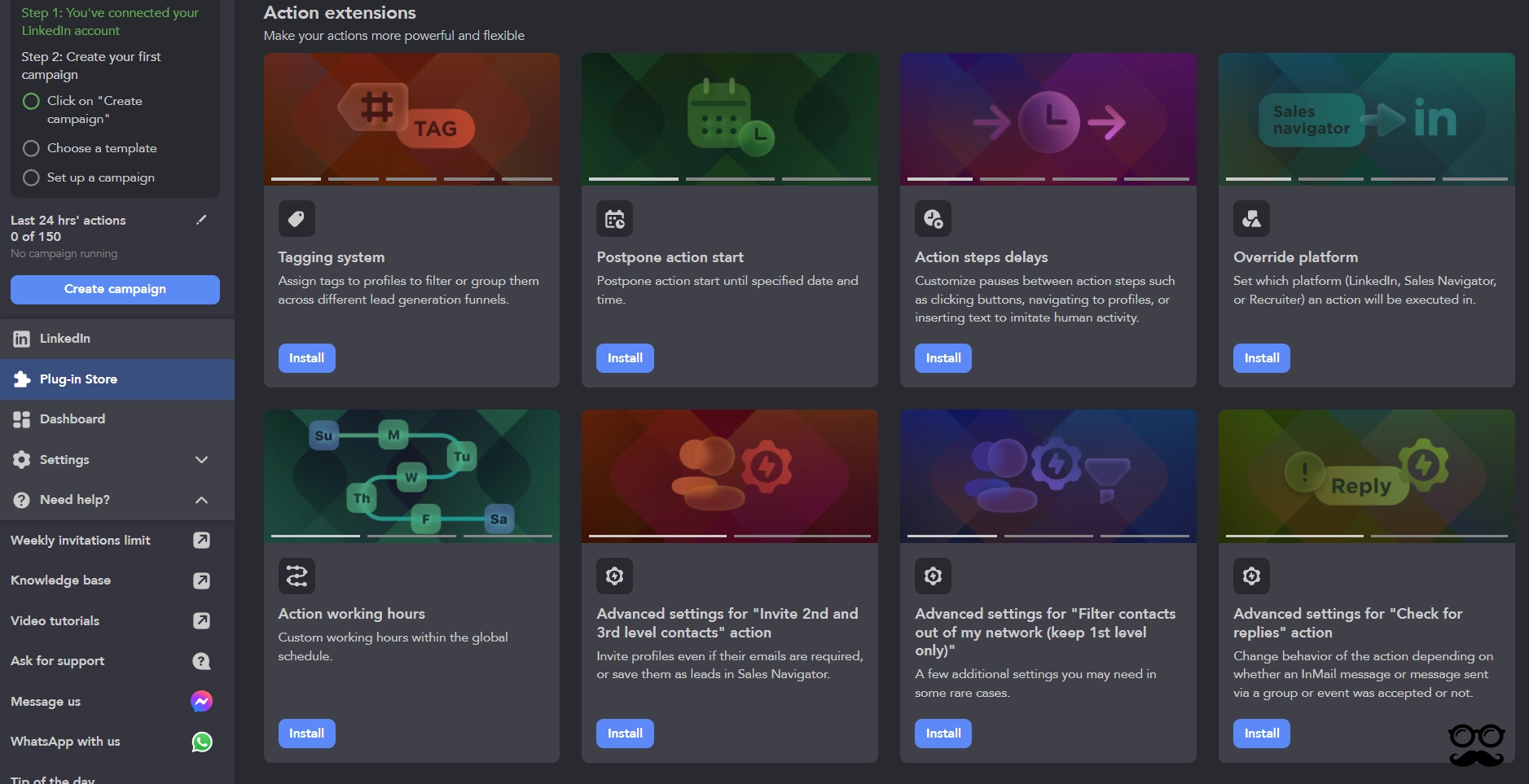
Solid set of advanced action controls with flexible tagging, scheduling, and environment-level overrides for granular workflow management.

Human-like delays, custom working hours, and conditional reply handling emphasize safety and execution precision.

A technically robust automation setup, best suited for users who prefer fine-tuned control over simplicity.

The platform targets users who need deep LinkedIn functionality: automated connection requests, messaging sequences, InMail campaigns, profile visiting, post engagement, and comprehensive data scraping.

LinkedHelper works with all LinkedIn account types, including Sales Navigator and Recruiter, making it particularly attractive to power users who want granular control over their LinkedIn activities. The tool includes a built-in CRM, campaign management dashboard, and native integrations with major CRM platforms—a significant technical differentiator in the LinkedIn automation space.

Key Features Deep Dive

Advanced Data Scraping & Export

LinkedHelper's data extraction capabilities are genuinely impressive. When I tested the profile scraping feature, I could extract not just basic information but also discover phone numbers and email addresses that aren't visible on LinkedIn profiles. The built-in Email Finder includes 610-3,200 credits depending on your plan, and the data can be exported to CSV or pushed directly to your CRM via webhooks. This is particularly valuable if you're building targeted prospect lists or enriching existing contact databases. The depth of data extraction exceeds what most competitors offer, though it does require understanding how to structure your searches and manage the exported data effectively.

Comprehensive LinkedIn Automation Suite

With over 20 automated actions available, LinkedHelper offers extensive LinkedIn-specific functionality. I tested features like skill endorsements, event invitations, and group messaging—actions that many simpler tools don't support. The platform includes advanced reply detection and conversation filtering, which helps manage responses efficiently. However, this breadth of features comes with complexity. The interface requires time to master, and setting up sophisticated sequences demands careful planning. For users who need every possible LinkedIn automation, this depth is valuable. For those wanting simpler outreach, it may feel overwhelming.

Built-in CRM with Campaign Management

The integrated CRM provides unlimited campaigns on the Pro plan, with dashboards showing KPIs, tagging systems, and full-profile data scraping. When I created multi-step campaigns, I appreciated the custom campaign builder and advanced message template editor with custom variables. The CRM functionality is comparable to Meet Alfred's offering, though it lacks the multi-channel orchestration that allows coordinating LinkedIn outreach with email and social media campaigns. If your workflow is LinkedIn-only, this CRM handles prospect management effectively.

Native CRM Integrations

This is where LinkedHelper demonstrates a clear competitive advantage. The platform offers direct integrations with HubSpot, Pipedrive, Salesforce, Zoho CRM, Close.io, ActiveCampaign, HighLevel, and Streak—all without requiring third-party tools like Zapier. When I tested the HubSpot integration, data flowed directly from LinkedIn searches into my CRM without middleware. This eliminates the complexity and cost of managing Zapier connections for CRM workflows. For teams with established CRM systems, this native connectivity is genuinely valuable and represents superior integration capabilities compared to platforms that rely entirely on Zapier for CRM connectivity.

LinkedHelper Pricing

LinkedHelper Pricing Review

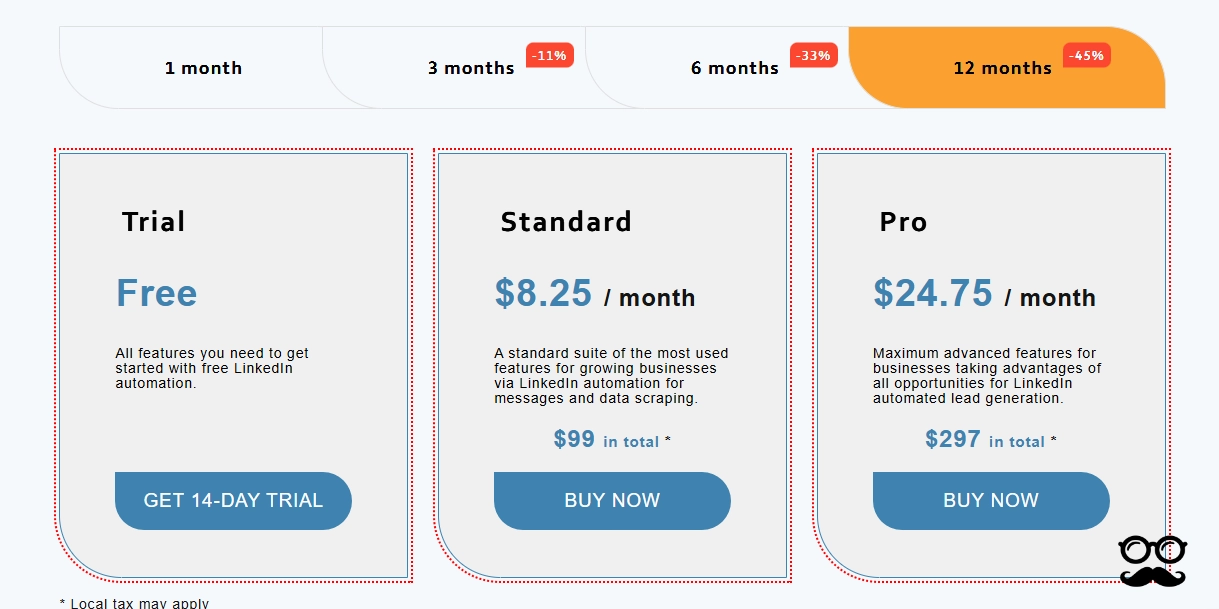
LinkedHelper offers three pricing tiers with significant discounts for annual billing:

Standard Plan:

$15/month (monthly) or $8.25/month ($99/year annual)

  • Unlimited campaigns
  • Group/event messages: 20/day
  • Email finder: 620 credits/month
  • All core LinkedIn automation features

Pro Plan:

$45/month (monthly) or $24.75/month ($297/year annual)

  • Unlimited campaigns
  • Unlimited group/event messages
  • Email finder: 3,100 credits/month
  • All Standard features plus advanced capabilities

Trial:

14-day free trial with all features available

LinkedHelper's pricing is notably aggressive—40-50% cheaper than Meet Alfred at comparable tiers. The Pro plan at $24.75/month (annual) versus Meet Alfred's Pro at $49/month (annual) represents substantial savings. However, there are important considerations beyond the headline price.

First, LinkedHelper requires you to bring your own proxy for the Agency and Unlimited tiers, which adds $10-30/month in additional costs depending on your proxy provider. Second, the platform is LinkedIn-only, so if you need email automation or social media outreach, you'll need separate tools. Third, while email finder credits are included, they're consumed quickly if you're doing significant prospecting—the Standard plan's 620 credits may last only a few weeks of active use.

Meet Alfred's pricing includes multi-channel capabilities (LinkedIn, email, X/Twitter) and doesn't require proxy setup, which changes the value equation. The 7-day trial for Meet Alfred is shorter than LinkedHelper's 14-day trial, but both provide adequate time to evaluate the platforms.

Is LinkedHelper Safe for LinkedIn?

LinkedHelper emphasizes safety as a core differentiator, claiming its desktop application architecture provides superior security because it doesn't embed code into LinkedIn pages. Based on my testing and analysis, this claim has merit but requires context.

The desktop application approach does offer certain advantages: it operates independently of your browser, uses dedicated IP addresses, and mimics human behavior patterns through randomized delays and actions. LinkedHelper has been in the market for 8 years without widespread reports of mass account restrictions, which suggests their approach works for many users.

However, no LinkedIn automation tool is completely risk-free. LinkedIn's terms of service prohibit automation, and the platform actively works to detect and restrict automated activity. LinkedHelper's safety depends heavily on how you use it—aggressive connection request volumes, generic messaging, or suspicious patterns can trigger LinkedIn's detection systems regardless of the tool you use.

Meet Alfred takes a different approach with cloud-based infrastructure, dedicated IPs, and proprietary AI that mimics human behavior patterns. Both platforms emphasize safety, but they achieve it through different technical architectures. The key safety factor isn't the tool itself but how conservatively you configure your campaigns and how closely your outreach resembles genuine human behavior.

Pros and Cons

Pros

Superior Native CRM Connectivity:
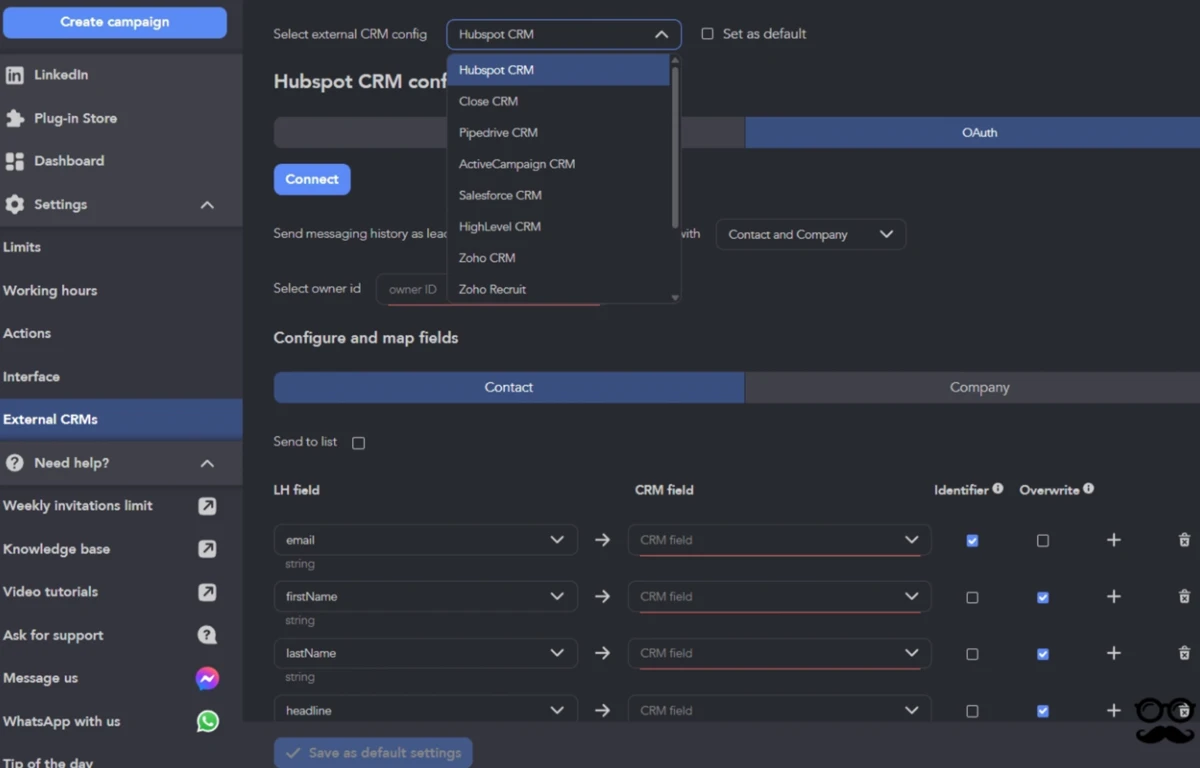
LinkedHelper's direct integrations with HubSpot, Pipedrive, Salesforce, Zoho CRM, Close.io, ActiveCampaign, HighLevel, and Streak eliminate the need for Zapier or other middleware. This is a genuine competitive advantage for teams with established CRM workflows.

Comprehensive LinkedIn Feature Set:

With 20+ automated actions including skill endorsements, event invitations, and group messaging, LinkedHelper offers deeper LinkedIn-specific functionality than most competitors.

Aggressive Pricing:

At $24.75/month (annual) for the Pro plan, LinkedHelper is 40-50% cheaper than comparable alternatives, making it attractive for budget-conscious users.

Powerful Data Extraction:

The built-in Email Finder and comprehensive profile scraping capabilities provide valuable data enrichment that exceeds what simpler tools offer.

Desktop Application Architecture:

For users concerned about browser-based tools, the standalone desktop application provides an alternative approach to LinkedIn automation.

Strong Customer Satisfaction:

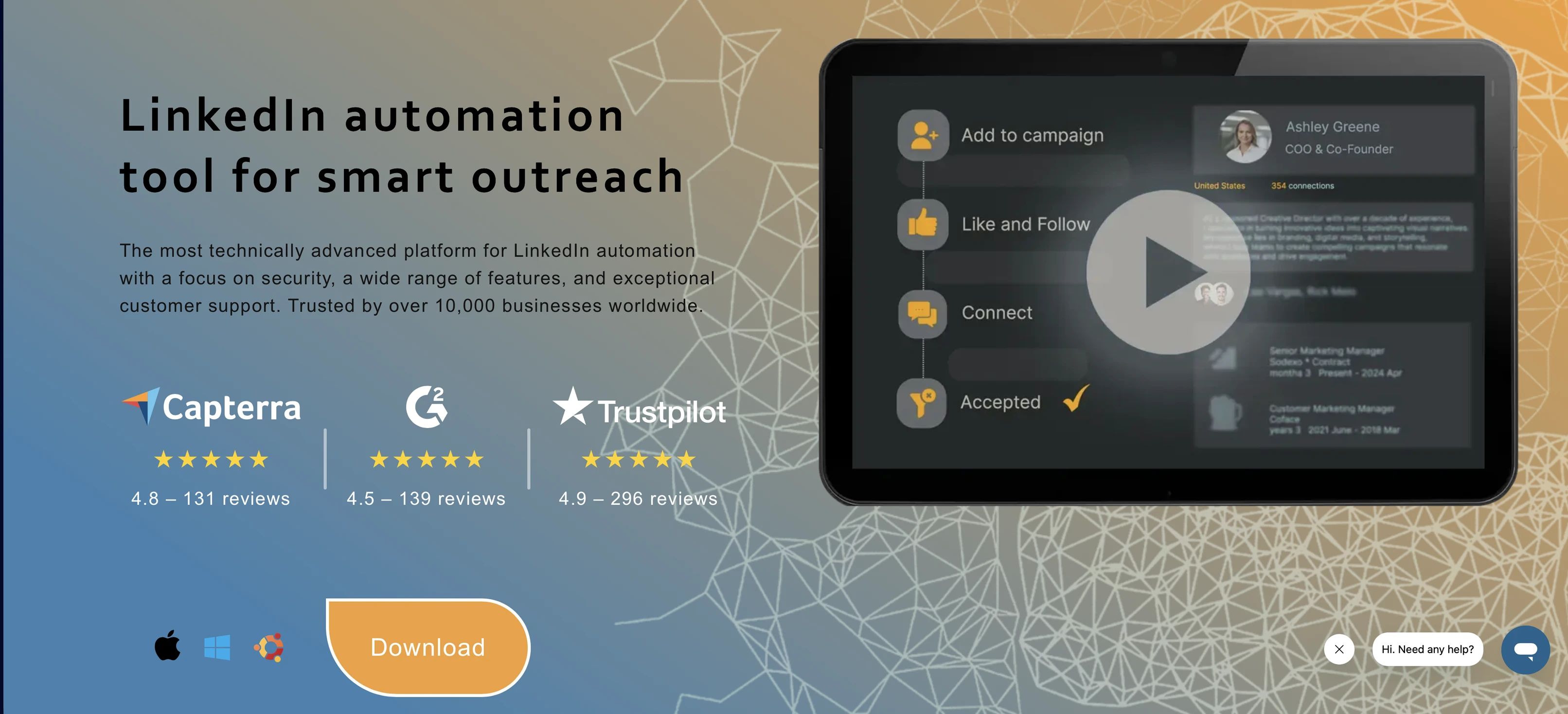
With a 4.9/5 rating on Trustpilot (296 reviews), users consistently praise the platform's reliability, feature depth, and responsive support team.

Cons

Desktop Application Dependency:

LinkedHelper requires installation on Windows, Mac, or Ubuntu and must remain running for campaigns to execute. This creates barriers for teams wanting browser-only access or true cloud-based operation.

LinkedIn-Only Platform:

The tool cannot orchestrate multi-channel sequences across LinkedIn, email, and social media—a significant limitation if your outreach strategy spans multiple channels.

Complex Interface & Learning Curve:

The platform's technical depth comes with complexity. Users consistently mention the learning curve, and the interface may feel dated compared to modern web applications.

Limited Team Collaboration:

LinkedHelper lacks advanced team features like workspaces, role-based permissions, and shared inbox management that agencies and larger teams require.

No White-Label Capabilities:

Agencies cannot rebrand the platform for client use, limiting its appeal for service providers.

Proxy Requirements for Scale:

Agency and Unlimited tiers require bring-your-own-proxy setup, adding $10-30/month in additional costs and technical complexity.

No AI-Powered Personalization:

The platform relies on standard variables and custom fields rather than AI-driven message optimization.

Feature Comparison Table

Feature
LinkedHelper
Meet Alfed
Pricing (Entry Level)
$8.25/month (annual)
$29/month (annual)
Channels Supported
LinkedIn only
LinkedIn, Email, X (Twitter), Facebook, Instagram
Safety Features
Desktop app, dedicated IPs, human behavior simulation
Cloud-based, dedicated IPs, proprietary AI, GDPR/CCPA compliant
Platform
Desktop application (Windows/Mac/Ubuntu)
Cloud-based web application
Native Integrations
HubSpot, Pipedrive, Salesforce, Zoho CRM, Close.io, ActiveCampaign, HighLevel, Streak, LinkedIn
LinkedIn, Twitter/X, Email, Facebook, Instagram, Zapier, Webhooks/API
Third-party Integrations
Zapier, Make, Automatic.ai, Webhooks
Zapier, Make, webhooks for custom workflows
Trial Period
14 days
7 days
Team Collaboration
Limited
Advanced (workspaces, roles, shared inbox)
White-Label
No
Yes (custom domain, logo, colors)

Frequently Asked Questions

How to cancel LinkedHelper?

To cancel your LinkedHelper subscription, log into your account and navigate to the billing or subscription settings. The platform allows you to cancel directly without contacting support. If your account is paused, you'll need to resume it first before the cancel option becomes available—this is a safety feature to prevent accidental cancellations during paused periods. No payment is required to cancel; simply resume, then immediately cancel if you wish to end your subscription. If you encounter any issues, LinkedHelper's support team responds quickly via email or chat.

LinkedHelper vs Meet Alfred: Which is better?

The answer depends entirely on your specific needs and workflow. LinkedHelper excels if you need deep LinkedIn-specific functionality, extensive data extraction, and native CRM integrations without middleware. Its superior native connectivity with HubSpot, Pipedrive, Salesforce, and other major CRMs eliminates Zapier dependency for CRM workflows. The platform is also significantly cheaper at $24.75/month (Pro, annual) versus Meet Alfred's $49/month (Pro, annual).

However, Meet Alfred is the better choice if you need multi-channel orchestration across LinkedIn, email, and social media. Its cloud-based architecture means no desktop application to manage, and it includes advanced team collaboration features, white-label capabilities, and AI-powered personalization that LinkedHelper lacks. For agencies, the white-label option and team management features are essential capabilities that LinkedHelper doesn't offer.

If your workflow is LinkedIn-only and you have an established CRM, LinkedHelper's native integrations and lower price point make it compelling. If you need to coordinate outreach across multiple channels or manage team collaboration, Meet Alfred's multi-channel capabilities and modern cloud infrastructure provide better value despite the higher price.

Is there a free alternative to LinkedHelper?

While LinkedHelper offers a 14-day free trial, there isn't a permanently free alternative that matches its feature depth. Meet Alfred provides a 7-day free trial that lets you test multi-channel automation across LinkedIn, email, and X (Twitter). This trial includes all Pro features, giving you access to unlimited campaigns, AI personalization, team collaboration tools, and native integrations.

The trial period allows you to evaluate whether Meet Alfred's multi-channel approach and cloud-based architecture fit your workflow better than LinkedHelper's LinkedIn-focused desktop application. Both platforms require paid subscriptions after the trial period, but the trial gives you adequate time to assess which platform aligns with your outreach strategy and technical requirements.

Final Assessment

LinkedHelper is a technically sophisticated LinkedIn automation platform that delivers on its promise of comprehensive functionality and robust data extraction. Its 8-year track record, 300,000+ user base, and 4.9/5 customer satisfaction rating demonstrate that it serves its target audience effectively. The platform's superior native CRM connectivity with HubSpot, Pipedrive, Salesforce, Zoho CRM, Close.io, ActiveCampaign, HighLevel, and Streak represents a genuine competitive advantage for teams with established CRM workflows—this direct integration eliminates the complexity and cost of managing Zapier connections. The aggressive pricing at $24.75/month (Pro, annual) makes LinkedHelper 40-50% cheaper than comparable alternatives, which is compelling for budget-conscious users. The desktop application architecture provides an alternative approach to LinkedIn automation that some users prefer for perceived security benefits. For power users who need every possible LinkedIn automation feature and extensive data extraction capabilities, LinkedHelper delivers exceptional depth.

However, the platform's limitations are equally important to understand. The desktop-only approach creates friction for cloud-native teams and requires keeping the application running for campaigns to execute. The LinkedIn-only focus means you'll need separate tools for email automation and social media outreach, which can fragment your workflow and increase total costs. The complex interface and learning curve demand time investment, and the lack of advanced team collaboration features and white-label capabilities limits its appeal for agencies and larger teams.

Meet Alfred takes a fundamentally different approach with multi-channel orchestration across LinkedIn, email, and X (Twitter), cloud-based infrastructure that requires no desktop application, and advanced team collaboration features including white-label capabilities. While Meet Alfred's pricing is higher at $49/month (Pro, annual), this includes multi-channel capabilities that would require multiple separate tools with LinkedHelper. The platform's AI-powered personalization, modern web interface, and team management features represent the evolution of LinkedIn automation for modern GTM teams.

Ready to choose? Here's the honest recommendation:

Try LinkedHelper if your outreach is LinkedIn-only, you have an established CRM workflow (HubSpot, Pipedrive, Salesforce, etc.), and you want the most cost-effective option with deep LinkedIn-specific features. Their 14-day free trial lets you test the full platform.

Try Meet Alfred if you need multi-channel outreach (LinkedIn + Email + Twitter), prefer cloud-based infrastructure without desktop apps, or require team collaboration and white-label capabilities for agency work.

Start your 7-day free trial with Meet Alfred — no credit card required. Or schedule a demo to get a quick walkthrough.

Start 7 Days Free Trial
[Troy-Nicoll]

What Clients Say
about our LinkedIn automation software

Meet Alfred has 78,299 users spread across 87 countries, including SizeBay, Amazon, Airbus, WeWork, and NextDoor. Here’s what just some of Meet Alfred’s satisfied clients have to say about its LinkedIn tools for business.

Mike refers to Meet Alfred as

«one of the best possible tools for LinkedIn automation»

Pavithra Kumar calls it a

«game changer»

Lucas Cinelli confirms that it is

«the best option at its price point»

Start taking advantage of the best LinkedIn software and book a demo with Meet Alfred.
Book a Meet Alfred Demo
Use Meet Alfred to Get Customers to Find You!

Speak to one of our Automation Experts Today

Start seeing results!