


Dripify publishes prices for two plans, Pro and Advanced, and bills each one by the seat, with every seat tied to a single LinkedIn account.
For one seller, the bill is easy to predict.
A team is a different story, mostly because team management only comes with the more expensive of the two plans.
In this guide, I'll show you how Dripify works out its pricing, what the free trial covers, which plan a team tends to land on, and what ten seats cost over a year.
➡️ I'll also cover the alternative I'd price next to it: Meet Alfred, our own platform, built to add email and X steps to LinkedIn outreach at a lower per-seat cost for teams.
TL;DR
- Dripify prices by the seat, one LinkedIn account each, with Pro at $59/user/month on annual billing.
- Advanced costs $79/user/month billed annually and is the cheapest plan with team management, split testing, step analytics, and lead tagging.
- There's no free plan, only a 7-day trial on Advanced features.
- Meet Alfred is the alternative I'd weigh against it, with three outreach channels in one sequence and team seats priced below Dripify Advanced.
How does Dripify calculate its pricing?
Dripify calculates its pricing per seat, where each seat connects one LinkedIn account, and the plan you choose decides which features that seat can use.
A team of four reps on four LinkedIn profiles needs four seats on either plan.
Based on my experience, the final number depends on four factors:
- Plan tier: Pro and Advanced share the same LinkedIn and email sequences and the same email finder, while Advanced adds team management, Advanced LinkedIn protection, and the testing and analytics tools listed below.
- Seat count: an extra LinkedIn account means another full seat, and from 10 seats Dripify points you to its sales team, who can also merge several individual subscriptions into one account on a single invoice.
- Billing term: a yearly commitment takes 25% off Pro and about 20% off Advanced, even though the pricing page advertises savings of up to 35%.
- Email finder credits: 100 credits a month come with every plan, with paid packs for anything beyond that.
What does each Dripify plan include?
Every Dripify plan includes LinkedIn and email sequences plus the email finder, with team features and hands-on support stacked onto the higher tiers.
At the annual rate, here's what you get on each plan:
- Pro, $59/user/month: unlimited drip campaigns, a dedicated inbox, analytics and reports, Built-in LinkedIn protection, the HubSpot integration, the Open API and MCP Server, and live support around the clock.
- Advanced, $79/user/month: everything in Pro, plus step analytics, split testing, lead tagging, evergreen leads, team management, and Advanced LinkedIn protection.
- Enterprise, custom quote: everything in Advanced, plus a customer success manager, premium onboarding, a custom mail finder, and dedicated technical support, with the price based on seat count.
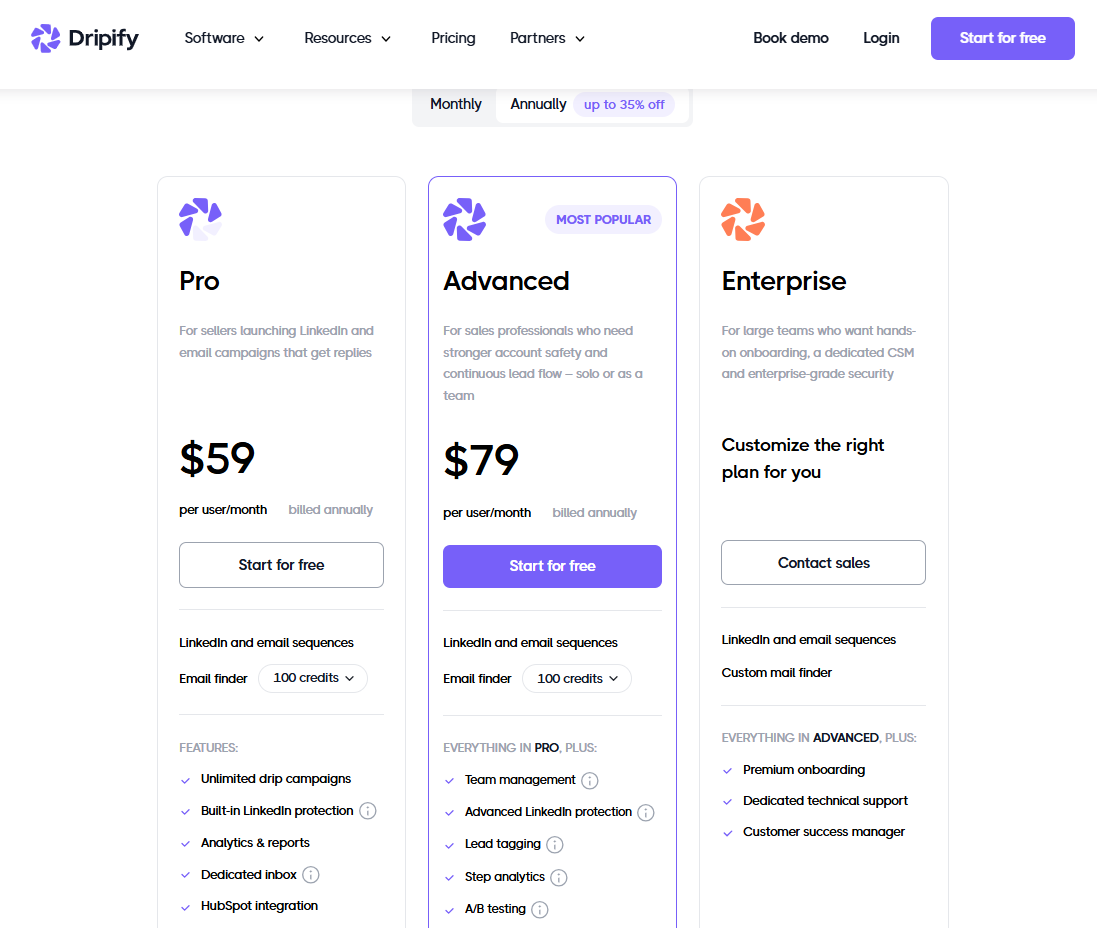
Dripify marks Advanced as its most popular plan and runs the free trial on it too.
Both published plans share a daily ceiling of 75 connection requests and upwards of 100 messages, with your own volumes set inside those ranges.
That means the move to Advanced won't raise the daily caps; the extra money per seat pays for team oversight, testing tools, lead tagging, evergreen leads, and stronger account protection.
On safety, I'd give Dripify credit across both plans, with campaigns sent from its cloud servers on a dedicated IP and randomized timing inside the working hours you set.
Does Dripify have a free plan or free trial?
Dripify has no free plan, but it offers a free 7-day trial that needs no card and unlocks the Advanced plan's features.
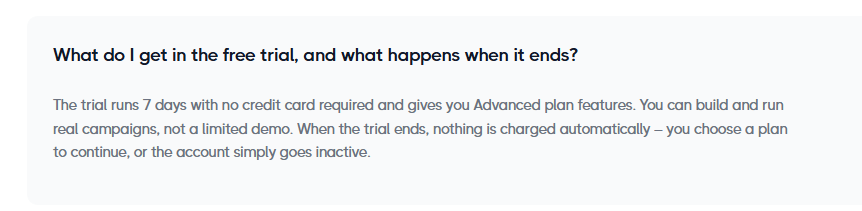
The trial runs real campaigns, so connection requests and emails reach actual prospects during that week.
Nothing is charged when the seven days end, and the account simply goes inactive until you pick a plan.
You'll want to make that choice carefully, because choosing Pro removes the six Advanced-only features the trial includes: team management, split testing, step analytics, evergreen leads, lead tagging, and Advanced LinkedIn protection.
Upgrades apply straight away, and downgrades wait for the next billing cycle, with seat counts adjustable from Billing whenever you need.
Cancelling from the Billing section doesn't cut access off early either, since you keep the plan through the end of the billing period you've paid for.
How much does Dripify really cost?
A single Dripify seat costs $708 a year on Pro with annual billing, based on Dripify's pricing page.
The same seat on Advanced adds up to $948 for the year.
Below, you can see how the monthly bill scales once you add seats or switch between annual and monthly billing:
The middle two rows are identical.
Advanced on annual billing costs exactly what Pro costs month to month, so a team lead weighing the two can get team management at the Pro monthly rate by committing to a year.
Over twelve months, five Advanced seats on annual billing total $4,740, with ten seats doubling that figure.
Which Dripify plan does a team end up paying for?
Any team that wants central oversight ends up paying for Dripify's Advanced plan, because Pro doesn't include team management.
On Advanced, a single admin login can see every rep's seat.
If you manage reps and want to check their campaigns without logging in and out of individual accounts, it's ideal to budget for Advanced from the start.
What extra costs come with Dripify?
The main extra cost on Dripify is email finder credits beyond the monthly 100 per seat, and some teams also pay LinkedIn separately for Sales Navigator.
A credit only comes off the balance once Dripify has found and verified an address, which makes a failed lookup free.
Sending email isn't metered on any plan, though unused credits expire after 30 days without rolling over.
When the included 100 run out, extra packs come in four sizes:
- 1,000 credits: $29.
- 2,000 credits: $49.
- 5,000 credits: $69.
- 10,000 credits: $99.
If you're working large cold lists, the bigger packs are the better buy, since the largest works out to about one cent per verified address against roughly three cents on the smallest.
Sales Navigator isn't required, as Dripify runs on every LinkedIn account type, including free ones.
Plenty of teams still add it for the filters, covered in our Sales Navigator guide.
Against the wider market, a single Dripify seat is mid-range, though team pricing climbs faster than with many tools.
If you want the wider picture, our breakdown of Dripify alternatives prices ten of them at 1, 5, 10, and 25 senders.
Are you looking for a Dripify alternative?
My pick for a Dripify alternative is Meet Alfred, especially for teams that want more channels in one sequence and a lower per-seat cost once several reps are sending.
Sales teams and agencies get the most from Meet Alfred in 2026, since email and X steps run in the same campaign as LinkedIn, and team management and client branding come on the same platform.
On top of the two channels Dripify covers, Meet Alfred adds X outreach and social post scheduling.
Below is how I'd normally set up a campaign in Meet Alfred: 👇
Step 1: Link your LinkedIn profile and set account limits
Setup begins by connecting your LinkedIn profile, and the two-factor authentication step happens inside the Meet Alfred app.
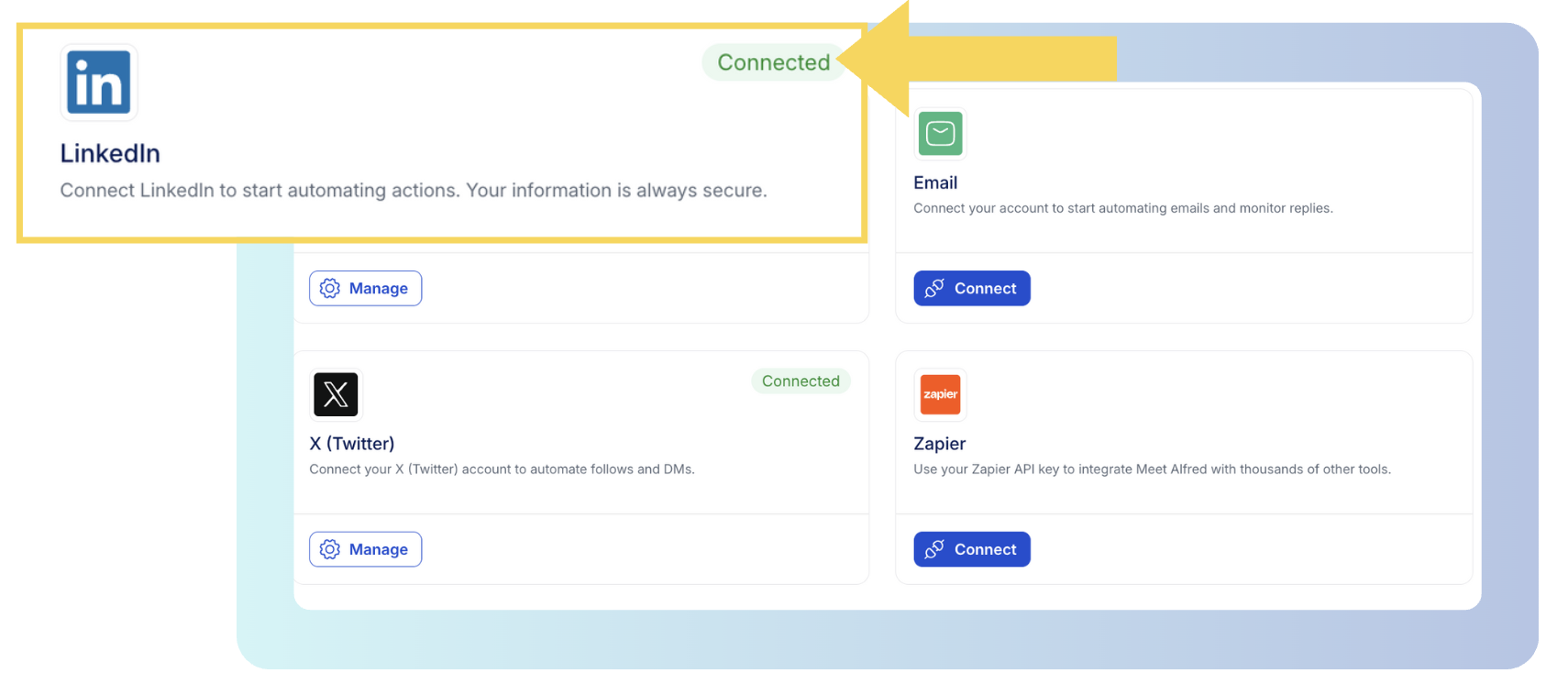
You control the account's behavior from Settings, using the options explained on our Customizable AI Settings page:
- Daily limits: up to 100 connection requests a day within safe parameters, though it's best to start lower on a new or quiet account and build up over a few weeks.
- Working hours: a schedule plus a time zone.
- Randomized pacing: irregular gaps between actions, closer to the rhythm of someone prospecting manually.
- Auto-withdrawal: pending invitations get withdrawn without you chasing them, with a separate analytics view logging each withdrawal.
Campaigns run on AWS servers from an IP address assigned to your account alone (our cloud infrastructure page has the details), so there are no proxies to source and no laptop to keep awake.
No setting removes the risk entirely, since LinkedIn watches for automation whichever tool you use.
Step 2: Choose who the campaign targets
I usually start with warm audiences in Meet Alfred, because they come from LinkedIn activity you can already see, like a post's engagers, an event's attendees, a group's members, or a newsletter's subscribers.
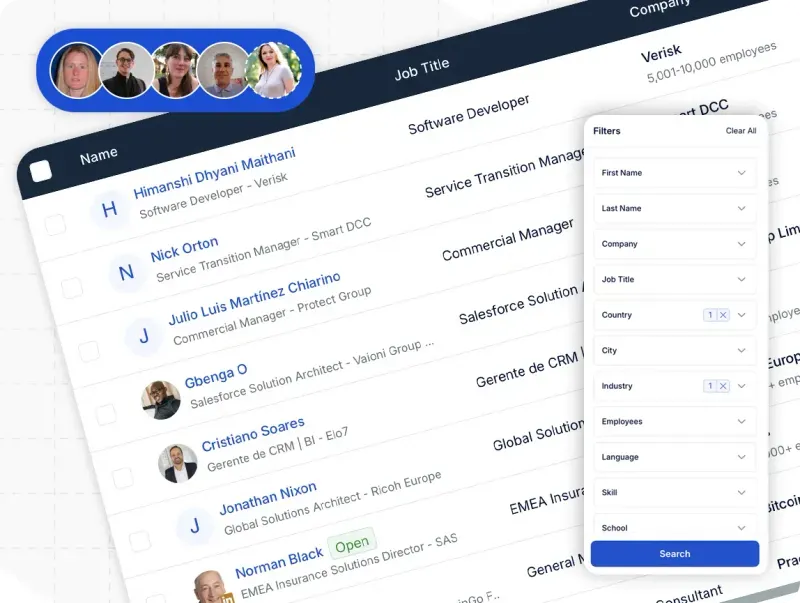
Cold lists begin in the AI Lead Finder, which filters on job title, industry, location, keywords, and language, then previews sample results before you set how many leads to include.
Two separate ceilings apply to Lead Finder searches.
Total results per plan range from 1,000 to 10,000, while each individual search returns up to 1,000 profiles on a Basic or Premium LinkedIn account and up to 2,500 with Sales Navigator.
Sales Navigator searches, Sales Navigator lists, LinkedIn URLs, and CSV uploads all work as sources too.
Every lead is then saved to our LinkedIn CRM, where it pays to tidy the list with tags, notes, exclusions, and the blacklist before anyone receives a message.
Step 3: Add email and X steps to the LinkedIn sequence
Meet Alfred's Multichannel Sequences builder lets you stack campaign steps in the order they should run, each with a wait period before it.
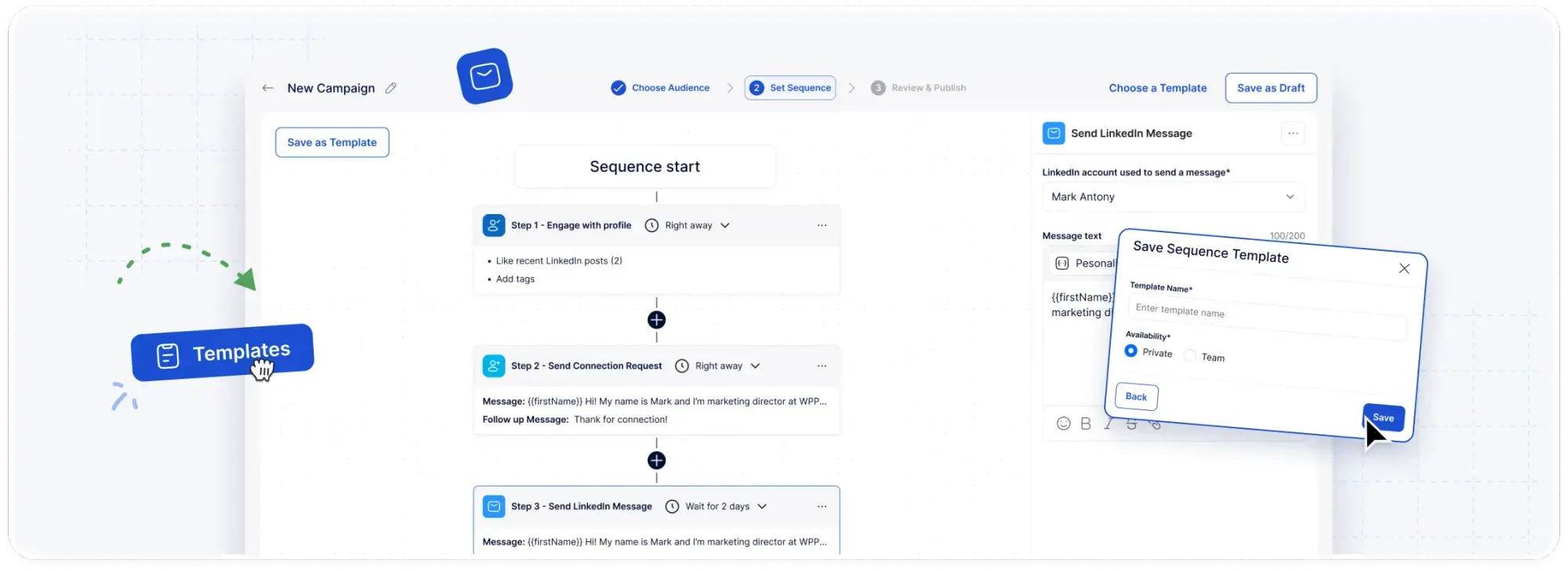
My usual sales sequence opens with a profile view, follows with a connection request, brings in an email step for anyone still pending after a few days, and keeps the X message for the end:
- Email automation uses the mailbox you already have, connected over SMTP or IMAP, with your provider setting the sending limit.
- On X, X (Twitter) outreach steps can message as many as 1,000 prospects daily with the templates you've already written.
- AI-Personalization pulls details like name and company straight from each LinkedIn profile into the copy.
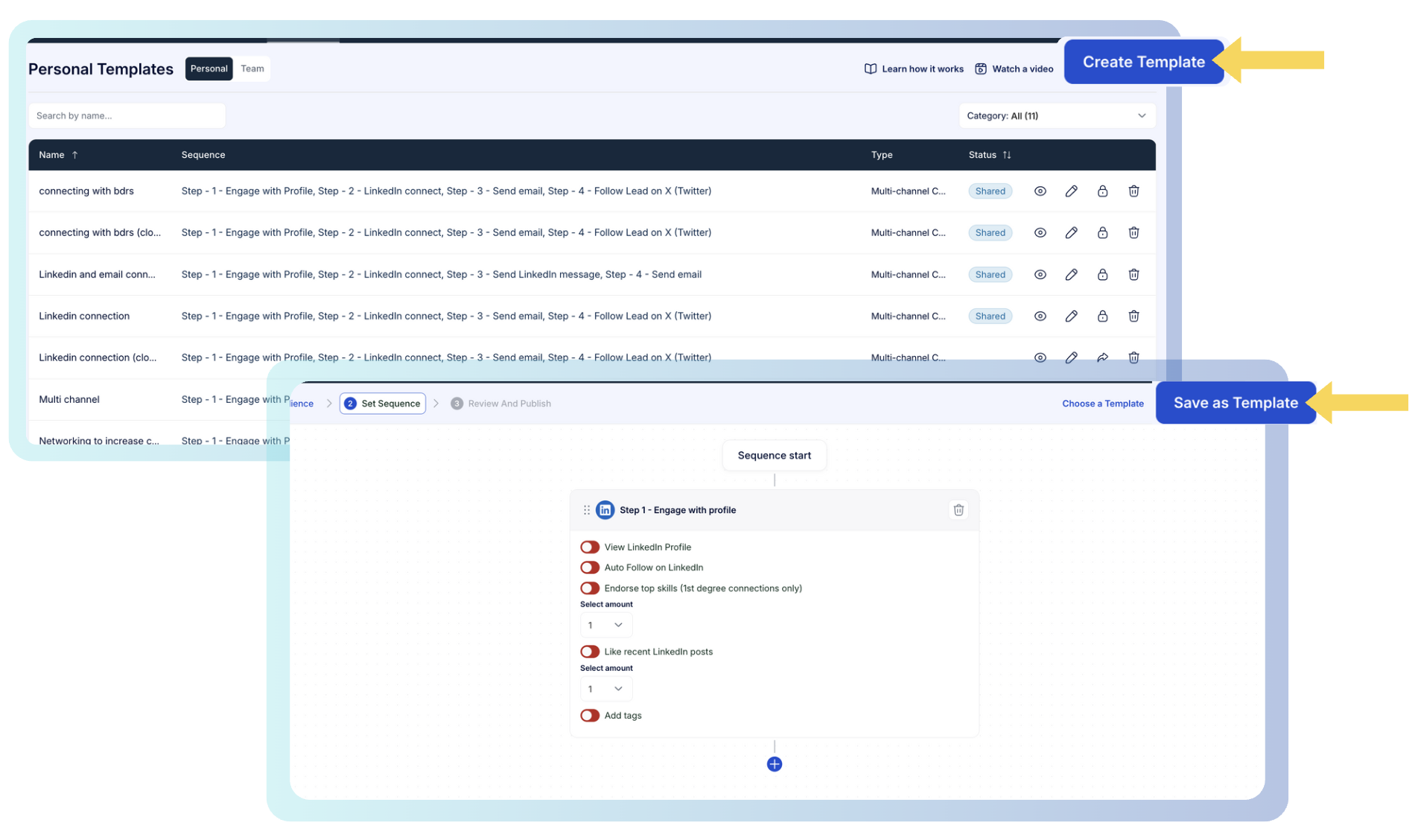
When a blank page slows you down, our Template Library offers more than 600 starting points sorted by channel and use case.
Outside campaigns, the social media post scheduler publishes to LinkedIn, Facebook, Instagram, and X from the same dashboard.
Step 4: Hand replies to the team in the Smart Inbox
When a prospect answers on LinkedIn, Meet Alfred's reply detection pauses that person's campaign, and the next message they get comes from a human.
Our Smart Inbox displays the thread next to the prospect's job title and company, along with any tags and notes.
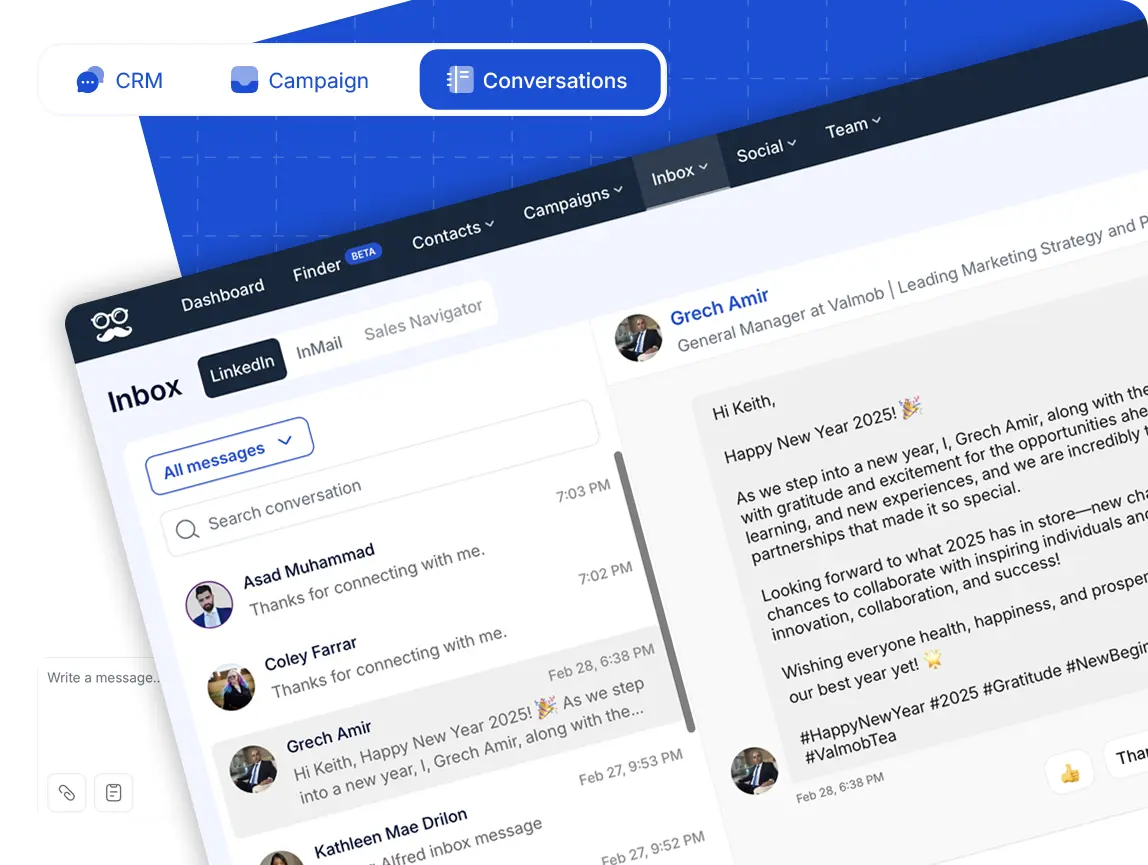
On a team account, the Team Inbox brings every rep's LinkedIn and Sales Navigator conversations into one list, with role-based permissions controlling who can change what.
Team Collaboration also includes Impersonation, for managers who need to reply from a teammate's connected account without anyone sharing a password.
Once a thread stalls, I'd send that lead back into a campaign straight from the inbox.
Step 5: Report on results under your own brand
Meet Alfred's Reporting & Tracking dashboard follows connections made, replies, clicks, opens, and conversions across all three channels, with team analytics broken down by rep.
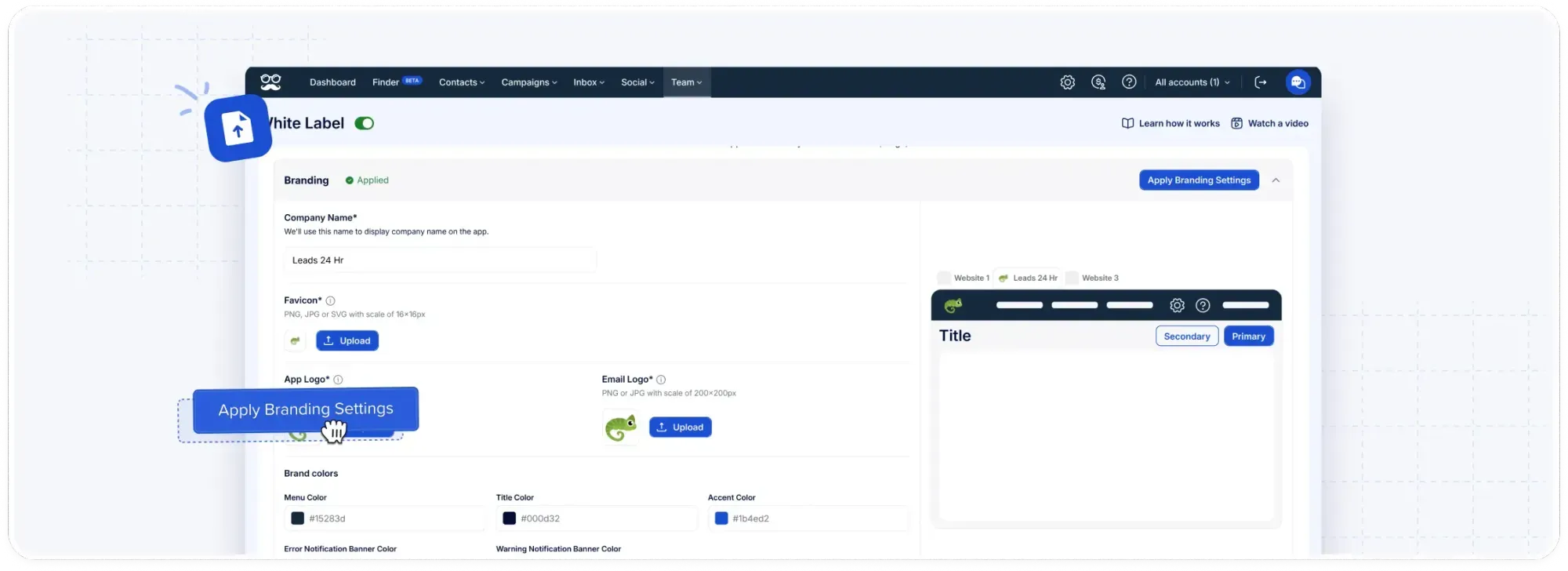
Agencies can switch on White Label to put their logo, their colors, a custom domain like app.youragency.com, and a sender address for system emails on the platform.
Groups organize accounts by campaign or project, while onboarding and volume pricing for multi-client teams are covered on our page for agencies.
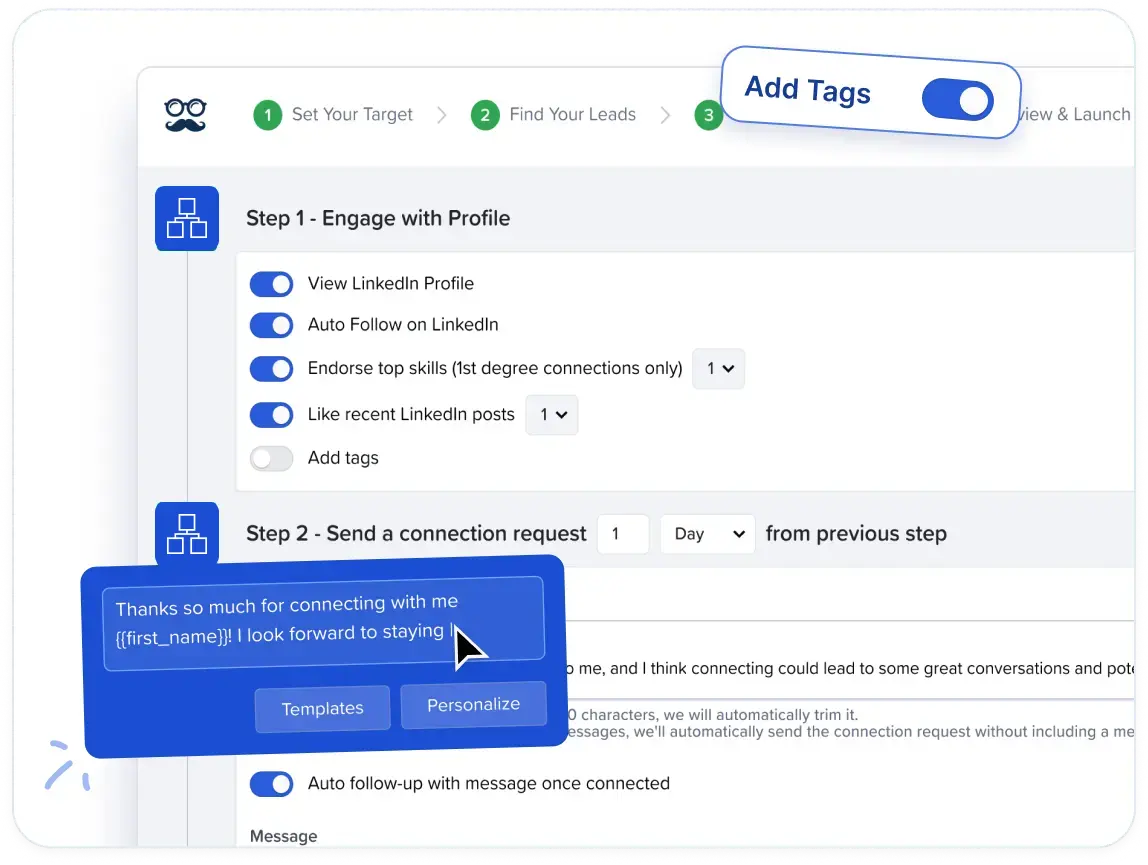
Through our integrations, contacts and replies can sync into Salesforce or HubSpot, and Zapier connects Meet Alfred to more than 5,000 other apps.
How much does Meet Alfred cost?
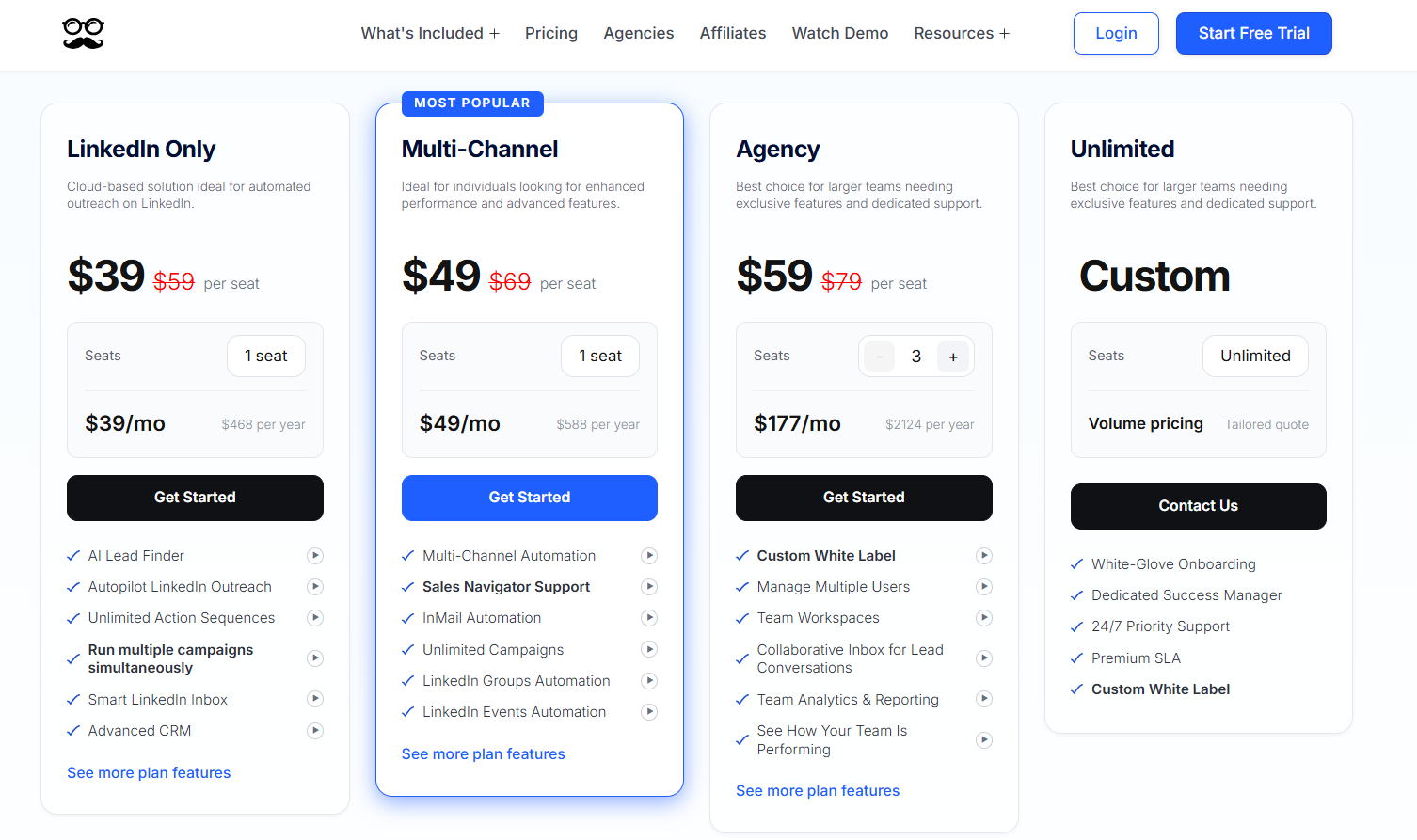
We sell four plans, the cheapest at $39/seat/month billed annually, and any of them can be tested on a 7-day free trial that needs no card.
- LinkedIn Only, $39/seat/month billed annually: automated greetings, templates, the CRM, the Smart LinkedIn Inbox, 1,000 Lead Finder results, and simultaneous sequences of any length on Basic or Premium accounts.
- Multi-Channel, $49/seat/month billed annually: the tier where email and X join LinkedIn, alongside Sales Navigator, InMail, unlimited campaigns, newsletter and event sources, social scheduling, CRM integrations, Zapier, webhooks, and a Lead Finder capped at 5,000 results.
- Agency, $59/seat/month billed annually, three-seat minimum: Multi-Channel plus a collaborative inbox, team workspaces, roles and groups, team analytics, Salesforce and HubSpot, white label, an account manager, priority support, and a Lead Finder capped at 10,000 results.
- Unlimited, custom: round-the-clock priority support, a dedicated success manager, custom white label, a premium SLA, and white-glove onboarding, all on a quote sized to your seat count.
So, is Dripify worth it in 2026?
Dripify is worth it in 2026 for solo sellers and small teams who run LinkedIn and email from one account each and want email finding and a HubSpot sync in the same tool.
Split testing and step analytics are there too, once they move up to Advanced.
To be fair, Dripify deserves credit for publishing its Pro and Advanced prices openly, along with a trial that runs real campaigns on Advanced features.
The costs grow with headcount, though.
Every LinkedIn account counts as a full seat and team management only comes with Advanced, so a ten-person team on annual billing pays $9,480 a year at list price before buying any credit packs.
The "up to 35% off" promise on the pricing page is also higher than either current plan delivers.
If your team needs a third channel, or you're pricing five seats or more, my recommendation is Meet Alfred, with lower per-seat pricing at team sizes and X steps placed alongside LinkedIn and email in a single sequence.
The AI Lead Finder, the Team Inbox, Impersonation, and White Label all come together on our Teams plan.
Dripify's split testing and step analytics still go further than our reporting on message-level detail, and for a team that works by testing copy, that's a fair reason to stay.
➡️ You can try Meet Alfred free for 7 days with no card needed, or book a demo for a quote based on your headcount.
⚠️ Disclaimer: This article was last updated on 17th of November, 2026. If there's any misinterpretation of the information, please contact us, and we will fact-check it.
FAQs
Is Dripify's annual plan worth it over monthly billing?
Yes, if you'll use Dripify for a full year, as annual billing saves 25% on Pro and about 20% on Advanced.
On a single Advanced seat, that saving adds up to $240 over twelve months.
My one caution is the short trial.
Seven days is often too short for a multi-step sequence with delays to finish, so my advice is to start on monthly billing and move to a yearly plan only once a campaign has shown real results.
Does Dripify charge for sending emails?
Dripify doesn't charge for email sending on any plan, and its credits only cover finding and verifying business email addresses.
Each seat gets 100 of those credits a month, with nothing deducted for a lookup that comes back empty.
In practice, a seat working 500 new prospects a month will run through that allowance well before the month ends, and that's typically when the 1,000-credit pack at $29 shows up on the invoice.
Can one Dripify seat run more than one LinkedIn account?
One seat covers one LinkedIn account on Dripify, and a second profile needs a second seat.
Advanced lets one administrator manage all of them from a single login, but each account is still billed on its own.
If I were running an agency with several client profiles, that per-account cost is the first number I'd model, because every new client adds a full seat to the monthly total.
Meet Alfred also prices per seat, though our Teams rate is lower and comes with White Label for client-facing work.
Does Dripify require Sales Navigator?
Sales Navigator isn't required for Dripify, which runs on every LinkedIn account type, free accounts included.
Some teams add it for the search filters, as a separate LinkedIn subscription billed per user on top of each Dripify seat.
In that case, it belongs in the per-rep cost from day one.
Meet Alfred supports Sales Navigator searches and lists too, with Sales Navigator discounts available through us.
How much does Dripify cost for a solo founder?
A solo founder pays $59 a month for one Dripify Pro seat on annual billing.
Pro tends to cover a one-person setup well, with unlimited drip campaigns and email steps alongside LinkedIn already included.
The bill grows once you start emailing people outside your network.
I tend to tell founders that 100 credits a month only covers a small cold list, and adding the 1,000-credit pack takes the monthly total to $88.
How much would a sales team of 5 to 10 reps pay for Dripify?
Five reps on Dripify Advanced cost $395 a month with annual billing, and ten reps double that.
Ten seats is also where Dripify asks you to contact its sales team, which can lead to an Enterprise quote with premium onboarding and a customer success manager.
With a team this size, I'd price the year upfront.
At ten Advanced seats, the difference between monthly and annual billing reaches $2,400 a year.
What does Dripify cost an agency running client accounts?
An agency pays for one Dripify seat per client LinkedIn profile, so running eight client accounts on Advanced comes to $632 a month with annual billing.
Advanced is the realistic plan here, since team management lets one person oversee all eight accounts from a single login.
Dripify's published plans don't list a white label option.
If clients will see the platform, I'd raise branding with Dripify's sales team before signing.
Meet Alfred's Teams plan includes White Label, and agencies can also request volume-based quotes through our agencies program.
Gustavo Parra is a Senior SEO & Content Strategist at Meet Alfred, where he specializes in LinkedIn automation, AI-driven outreach, and account-safe growth strategies. He works closely with product, engineering, and support teams to design automation frameworks that help sales teams and agencies scale LinkedIn outreach while minimizing risk. Gustavo focuses on turning real platform data and firsthand product experience into practical, compliance-first guidance.
Related Articles


